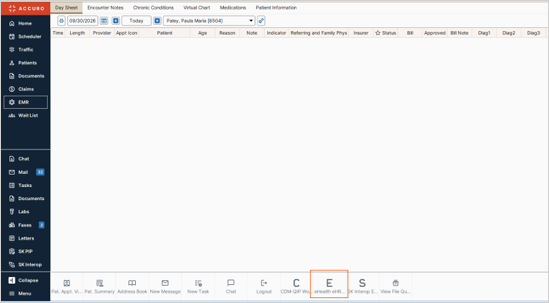
Launch in Context configuration for Accuro
Complete the following steps to configure Launch in Context (LIC) in Accuro EMR using your eHR Viewer credentials.
1
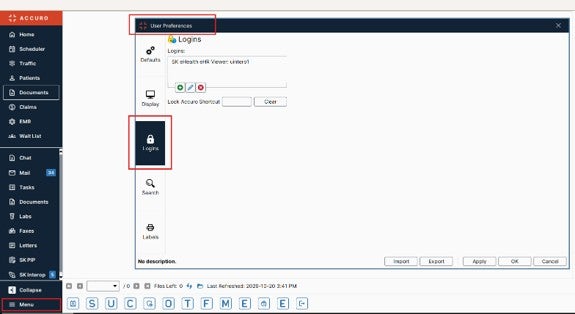
In Accuro EMR, navigate to Menu > User Preferences > Logins.
2
Select SK eHealth eHR Viewer from the list of configured logins.
3
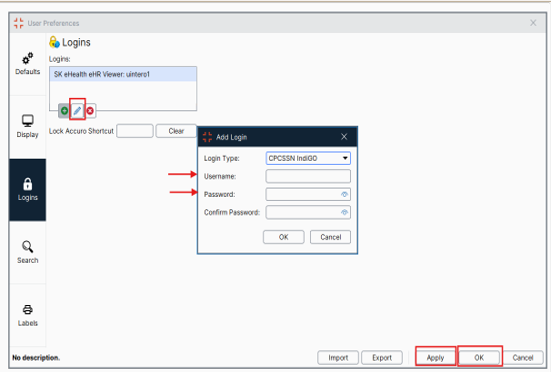
Select the Pencil icon and verify that the Login Type is set to SK eHealth eHR Viewer.
4
Enter your eHR Viewer Username and Password, confirm the password and select OK.
NOTE: If your eHR Viewer username and password have already been entered, you do not need to re-enter them. Simply verify that the correct credentials are configured in the EMR.
5
Select Apply, then OK, to save the configuration.
6
Launch eHR Viewer from within the EMR to confirm that Launch in Context (LIC) is functioning correctly.